
Information for ANZTCT 2026 Speakers
Thank you for agreeing to speak at the fourth annual ANZTCT Annual Scientific Meeting (ASM). We’re delighted to have you involved and truly appreciate your contribution to the program.
Below you’ll find key information to help you prepare for your session. If you have any questions about the ASM or your participation, or need clarification on anything included here, please don’t hesitate to contact us or view our FAQ page for general queries.
Quick Contacts
Speaker Care (on behalf of ANZTCT)
Carolyn Todd • Slatterys
Email: carolyn@teamslatts.com.au • Phone: 03 9663 3093
ANZTCT Annual Scientific Meeting 2026
Wednesday 26 – Friday 28 August 2026 • Melbourne Cricket Ground (MCG), Melbourne
Wednesday 26 August 2026
8:00AM – 5:00PM AEST
ASM Program Day 1
5:00PM – 6:00PM AEST
Welcome Drinks & Posters
Thursday 27 August 2026
8:30AM – 5:00PM AEST
ASM Program Day 2
6:30PM AEST
ASM Dinner – The George on Collins
(Paint the Town RED with Arrow – ticketed event)
Friday 28 August 2026
8:30AM – 1:15PM AEST
ASM Program Day 3
2:00PM – 5:30PM AEST
ANZTCT Plasma Cell Dyscrasia Satellite Symposium
6:00PM AEST
Symposium Faculty Dinner
Key Actions Checklist
ASAP
- Speakers & Chairs: Please ensure your speaker profile is complete on the ASM website: meeting.anztct.org.au/2026/speakers/
- If not already provided, please send:
– High-resolution headshot
– Speaker biography
– Presentation / research / project details (if applicable)
By COB
Friday 31 July 2026
- Confirm any special AV requirements for your presentation
By COB
Monday 10 August 2026
- Speakers using slides: Submit a draft of your presentation using the ANZTCT ASM PowerPoint template for testing (You may update your slides after this date)
- Provide:
– Mobile phone number
– Expected arrival time/date
Speaker Briefings (Microsoft Teams)
We’ll be hosting informal speaker briefing sessions to run through session flow, key logistics, and answer any questions alongside your fellow speakers and chairs.
- Briefings commence: Monday 27 July 2026
- Calendar invitations will be sent well in advance
We would encourage all speakers to attend their allocated briefing if possible, as these sessions are a great opportunity to meet your fellow speakers and chairs, gain an overview of how your session will run, and ask any questions ahead of the meeting.
We appreciate that attending may not be practical for everyone, particularly our international speakers. If you’re unable to join your allocated session, please let us know and we’ll be happy to arrange an alternative time to discuss your session. A summary of the key points and outcomes from each briefing will also be shared with all speakers following the meeting.
Presentation Slides
Please use the official ANZTCT ASM 2026 PowerPoint template for all presentations.
– Download template from Dropbox
– Download template from HubSpot
This year’s theme
The 2026 Melbourne ASM design reflects our continued growth as a community and the significance of gathering in Melbourne for this year’s meeting. The slide template has been designed to align with the overall ASM visual identity.
Submission details
Please upload your slides and any supporting files via Dropbox (link below) by COB Monday 10 August 2026:
https://www.dropbox.com/request/03d3ceowvdpp1l15zddk
You will receive a confirmation email from Dropbox once your files are uploaded.
File requirements
- Include your full name in the file name
– e.g. ANZTCT-ASM-2026-John-Smith.pptx - Version control encouraged – V1, V2, or date (YYMMDD)
– e.g. ANZTCT-ASM-2026-John-Smith-V1.pptx
– e.g. ANZTCT-ASM-2026-John-Smith-260728.pptx - Preferred file size: under 150MB (or zipped if larger)
- Please include fonts, videos, and supporting files where relevant
- Submit a PDF version where possible for post-event distribution
Accepted formats
- Microsoft PowerPoint (preferred)
- PDF (Adobe Acrobat)
- Other formats – please contact Carolyn at carolyn@teamslatts.com.au
Please let us know if your slides are not Windows-compatible so we can ensure a smooth technical setup at the venue.
Videos
Please do not rely on internet access for anything! If you are using videos in your presentation, we cannot accommodate online video platforms such as YouTube, Vimeo, etc. Please ensure videos are embedded in MP4 or equivalent format and saved as a separate file for backup.
Recording & distribution
Slide decks may be shared with attendees following the meeting unless you advise otherwise. Please let us know as soon as possible if you do not consent to your slides being distributed. Where possible, please also submit a PDF version of your slides for post-event sharing.
Promoting ANZTCT ASM 2026
To assist you in promoting your involvement with ANZTCT ASM 2026 we have created a resources page here →
This page is a live resource, so be sure to check back regularly for more material.
Please be in touch if there is anything more specific you would like us to create for you (copy, images etc.) and we will do our best to make it happen!
On the Day
All presentations will be pre-loaded onto the venue system and displayed on a screen behind the speaker.
You will have:
- Wireless clicker for slide control
- Lectern with microphone
- Lapel or handheld microphone options
- Foldback screen – positioned on floor at angle showing mirror of slides
A member of the Slatterys team will provide timing cues from the room.
AV and Room Set-up
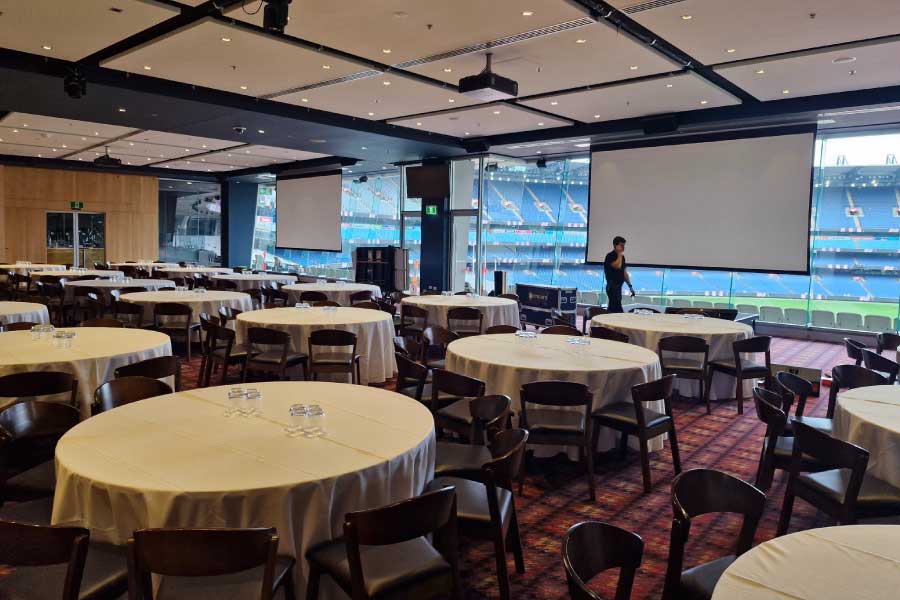
The Olympic Room where the ASM will be held has lots of natural light where attendees will be seated on round tables.
There are two big screens either side of the stage where the speaker and lectern are set up with the oval behind them – so the audience looks toward the oval.
This is a picture that gives you a glimpse of the Olympic Room where the ASM will be held. You can also view it here →
Timing
Please ensure you adhere to your allocated time to keep the program running smoothly.
Abstract speakers should allow approximately 10 minutes presentation + 5 minutes Q&A and include disclosure statements on their slides.
At the end of your session, please:
- Return all microphones to the AV desk
- Leave the wireless clicker at the lectern
Role of Chairs
- Introduce speakers
- Facilitate Q&A (if time allows)
- Keep sessions on time
Chairs will receive a session script in advance and will have access to a lectern timer.
Please note:
- Sessions should not commence until confirmed ready by the Slatts and AV team
- Doors must be closed before starting
Frequently Asked Questions
For general information, please view this FAQ page →
Is WiFi available?
Will attendee contact details be shared?
Will sessions be recorded?
Will media be present?
How many attendees are expected?
Where should I stay?
Accommodation recommendations and discounted rates are available here.
What should I wear?
Do I need to stand at the lectern?
Will I be able to see my speaker notes?
The foldback screen will mirror your slides, but speaker notes may not be visible. We recommend bringing printed notes if you need them.
Can I play a video during my presentation?
What if I miss the slide submission deadline?
Please submit at least a draft by the deadline — you can update your slides after this date. If you’re having trouble meeting the deadline, contact Carolyn at carolyn@teamslatts.com.au as soon as possible.
Are there Poster specifications?
- A0 size, portrait orientation
- No specific font requirements
- Posters must be printed and brought by presenters and given to the reception desk before lunchtime on 26 Wednesday August 2026.
- If you would like your Poster returned to you, please ensure you have provided a labelled cylinder or packing that can be used easily. Please collect your poster before leaving the venue, as posters that are not collected will not be kept.
- Presenters must be available during the poster session at 5:00PM Wednesday 26 August 2026 to answer questions.
Should I test my slides before my session?
Will my presentation be pre-loaded or do I need to bring my own laptop?
What's the screen ratio at the MCG?
What AV equipment will be available to me?
What if I have specific AV requirements?
Please flag any special requirements – such as live demos, polling tools, or sound – with Carolyn at carolyn@teamslatts.com.au by Friday 31 July 2026 so the AV team can prepare accordingly.